Coins irradiated on the MBL can be transferred to the BTL bunker using the Solid Target Transfer Station (STTS). The software to control the STTS is GP-Viewer EX and it is hosted on the Server. To use it, log in to the Server using Remote Desktop and follow the steps below:
Execute the “GP-Viewer EX” icon on the Server Desktop.
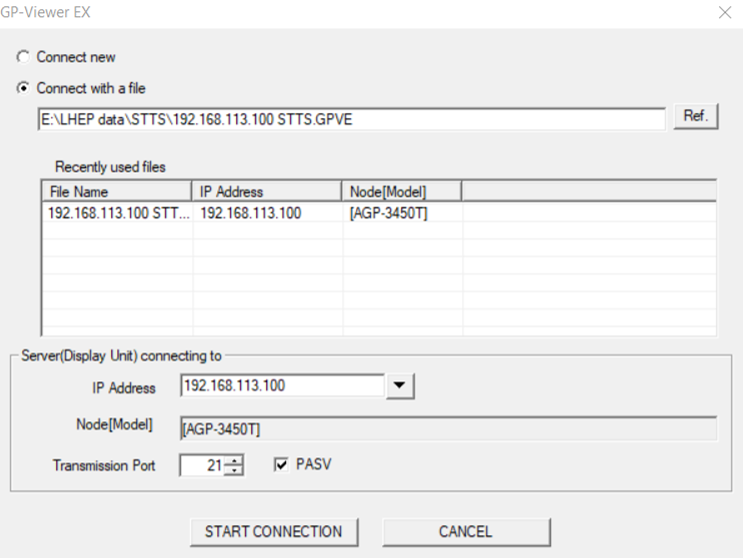
On the Startup screen shown below, select the option “Connect with a file” and select the already created file from the list. If the file is not there, browse the computer for the .GPVE file. It should be located under “E:LHEP dataSTTS". Make sure the “PASV” option is selected and click “Start Connection”.
In case of error, make sure that your paths are edited correctly within your .opvn file.
From the home page select which target you need to delivery in “B” position, then follow the instruction below. (you have to do these operations logged as admin):
Go to menu, setup parameter, maintenance, shuttle, and select the shuttle number to deliver in B position.
On “command word” label type the following sequence of numbers:
23 # command enable.
2 # shuttle goes in position (under the arm).
3 # removing the cap.
5 # shuttle goes in receiving position.
# wait for target dropped.
2 # shuttle goes in position.
4 # inserting the cap.
7 # shuttle goes to delivery position.
Back to home page
Go to menu, bypass, next, next, and follow the instructions below:
Forcing open knife B.
Forcing close knife B.
Forcing sending EV “ON”.
Forcing sending EV “OFF”.
Forcing arriving EV “ON”. #first valve (BTL bunker)
Forcing sending air “ON”.
Wait for the target delivered (approximately time of automatic delivery).
Forcing sending air “OFF”.
Forcing arriving EV “OFF”. #first valve
Forcing EV box “ON”. #second valve (BTL bunker)
Check for the target in the leadpot.
Forcing EV box “OFF”. #second valve
IMPORTANT: After every delivery be sure that all Forcing are disabled before starting a new delivery.
Measuring activity with the Cadmium Zinc Telluride (CZT) detector (Gaia)